Skip to content
Sheetli
TemplatesEvents & travelHoliday Gift Mission Control
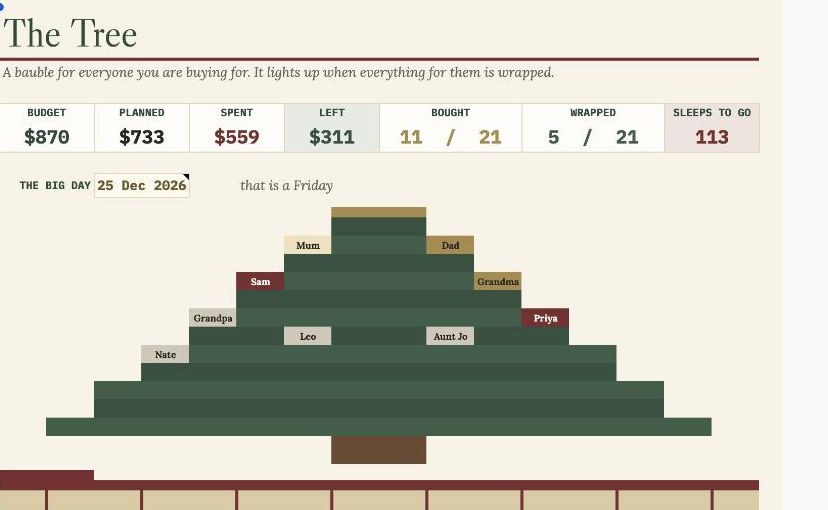
The Tree — a bauble for everyone, a present under it for everyone; the bow goes on when they are done

The Tree — a bauble for everyone, a present under it for everyone; the bow goes on when they are done

What it does

Every gift, every person, every dollar — and a tree that lights up as you go.

A gift list in your Notes app tells you what to buy. It cannot tell you that Dad is done, Sam is over budget, Grandma still needs two things and Priya's earrings are somewhere in the post. This one draws a tree, hangs a bauble on it for everyone, and lights them up as you finish.

A bauble for everyone, and it lights up when they are done.

Put in the people and what you mean to spend. A bauble appears on the tree the moment someone has a gift planned, turns gold while you shop, cranberry when everything is bought, and lights up warm white when every last thing for them is wrapped. Under the tree, their present gets its bow at the same moment.
The money, on the tag.

Each present has a kraft gift tag with what you have spent against what you meant to. Go over and the tag turns red. The totals at the top — budget, planned, spent, left — are the whole holiday in four numbers, plus how many sleeps to go.

Three shopping lists that write themselves.

What is still to buy, what is in the post, and what is here but not yet wrapped — sorted by person, straight from the gift list, with a total on each. Take it to the shops.

What's inside

4 tabs

  • The Tree — a tree drawn out of cells with sixteen baubles and sixteen wrapped presents, each tag showing spent against budget and where you are with that person; underneath, the gift tags table it is all drawn from
  • [object Object]
  • Shopping List — still to buy, on its way, to wrap; sorted, totalled, always current
  • Start Here — plain-English setup, about three minutes
  • Sample data for Christmas 2026 preloaded so you can see it working, then clear it in seconds

Why this one

Checked, not eyeballed

  • The tree is the point: you can see who is done and who you have not started from across the room
  • No scripts, no permissions to grant — checkboxes and formulas only, so it works on the Google Sheets mobile app in the shop
  • Every formula tested against an independent simulation, including a person with no gifts, a gift with no price, and two people over budget
Formulas258
Evaluation errors0
Independent checks473
Bugs caught before release3

Built natively in Google Sheets. 473/473 checks against an independent Python recomputation — every bauble on the tree and every gift tag under it is checked against the table the scene is drawn from, and all three spilled shopping lists are re-derived in order. Three bugs caught: the BIG DAY label was clipped by the tree's narrow grid; the BOUGHT and WRAPPED counts overflowed their two-column tiles into each other (both now span three); and the tree's topper was a glyph rather than a drawn object, which is a motif and reads as clip art (now two brass cells over the crown).

The details

What you get
  • A thank-you page and email with your view-only Google Sheets link — open it, then File → Make a copy
  • Real checkboxes, sparklines and charts, built natively in Sheets
  • Instant delivery after payment; the link never expires
Your data stays yours
You take a copy into your own Drive. Everything you type lives in your copy. You can never edit the master, and I can never see a number in yours.
Good to know
Digital product — nothing is posted. Google Sheets only; you'll need a free Google account. Works on the Sheets mobile app. For personal use; please don't resell or redistribute the file. Something not working? Email me and I'll fix it.
Refunds
Instant digital downloads can't usually be returned once delivered — but if something doesn't work, message me before asking for a refund and I will sort it out. Full policies.

Goes well with

All templates →
Holiday Gift Mission Control
$7
Coming soon