Skip to content
All changes saved in Drive
100% $ % .0 B I S
SINKING!B2
fx
=BUY("Sinking Funds Vault", 10, "Sheets + Excel")
TemplatesMoneySinking Funds Vault
VAULTS — fill bars, pace status and this month's automatic allocation

VAULTS — fill bars, pace status and this month's automatic allocation

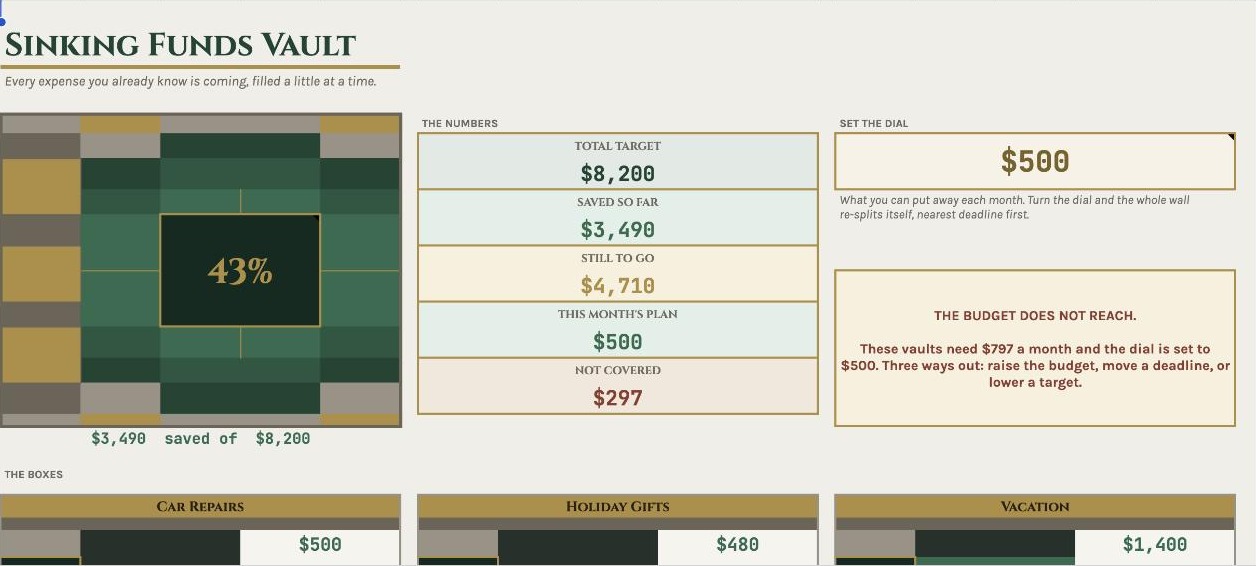
Stop being ambushed by bills you already knew about.

Car repairs. The insurance renewal. Christmas. The vet. None of these are surprises — they just arrive all at once and wreck a perfectly good month. A sinking fund fixes that.

Tell it one number. It does the rest.

Enter what you can save each month and the sheet splits it across every fund automatically — nearest deadline first — so nothing quietly falls behind. When a fund fills up, its share is freed and moves to the next one in the queue on its own.
It tells you the truth.

If your funds need more than your budget can cover, it says so, shows the exact shortfall, and names your three options: raise the budget, push a deadline out, or lower a target. No silent under-funding.

It knows whether you're actually on pace.

Every fund is compared against where it should be today, and marked AHEAD, ON TRACK, BEHIND or FULL — in colour, at a glance.

What's inside

5 tabs

  • VAULTS — up to 15 funds with targets, deadlines, fill bars, required monthly contribution, pace status, and this month's automatic allocation
  • DEPOSITS — 300 rows, with vault names as a dropdown so nothing gets mistyped
  • TIMELINE — a twelve-month projection of total saved and how many funds are full
  • START HERE — plain-English setup, about five minutes
  • Sample data preloaded so you can see exactly how it works, then clear it in seconds

Why this one

Checked, not eyeballed

  • No checkboxes to add, no scripts, no permissions to grant — it just works, including on the Google Sheets mobile app
  • Every formula tested against an independent simulation, including awkward cases like a deadline that has already passed and a budget that can't cover everything
  • Works in Google Sheets and Microsoft Excel — both files included
QA RECORD
Formulas308
Evaluation errors0
Independent checks141

141 checks over every vault's saved, left, required-monthly, allocation and pace figures, all four engine date calculations and all 36 timeline figures.

What you get

  • A PDF with your Google Sheets link — open it, then File → Make a copy
  • An .xlsx file for Microsoft Excel
  • Instant download after purchase

Your data stays yours

You take a copy into your own Drive. Everything you type lives in your copy. You can never edit the master, and I can never see a number in yours.

Good to know

Digital product — nothing is posted. You'll need a free Google account for the Sheets version, or Excel for the .xlsx. For personal use; please don't resell or redistribute the file.

Something not working? Email me and I'll fix it.

Goes well with

#sinking funds#savings tracker#savings goal planner#budget spreadsheet#expense planner#financial planner#money tracker