 Native Sheets
 Days with bills tint blue. Anything past due and unpaid turns red.
No hunting, no scrolling. You look at the month and you know.
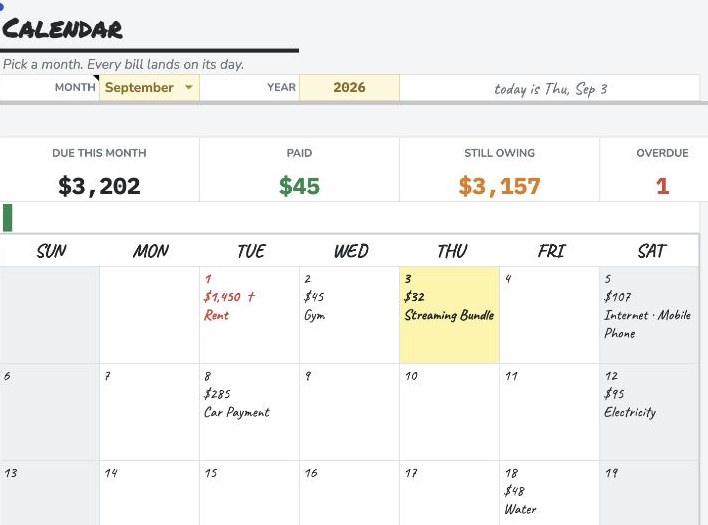
Calendar — every bill on the day it lands, with the day’s total and what it is for
What it does
A real wall-calendar grid where every bill sits on the day it lands — with the amount and the name right there in the square. Tick one off and the payment logs itself.
No hunting, no scrolling. You look at the month and you know.
Monthly, quarterly, half-yearly, annual — set the frequency once and the calendar works out which months it lands in. A bill due on the 31st automatically moves to the 28th in February instead of quietly disappearing. That last part sounds small until it's your rent.
Every bill is marked PAID, OVERDUE, DUE SOON or UPCOMING against today's real date, so the sheet is correct every morning without you touching it.
Year View adds up all twelve months and shows what each category actually costs you per year. Subscriptions is usually the one that stings.
What's inside
Why this one
Rebuilt natively in Google Sheets (v2), re-themed to the design charter 3 Sep 2026. 753 checks against Google's own calculation engine, including all 42 calendar cells character-for-character across the whole month grid, the 25-row sorted month list, all twelve monthly due-flags per bill, and every year-view and category total. Seven bugs caught across the three passes — the newest being a half-finished edit to the verifier's own category-icon map, which the verifier itself caught on the next run and reported as nine mismatched calendar cells.